AI-Powered Benefits Support for Employees
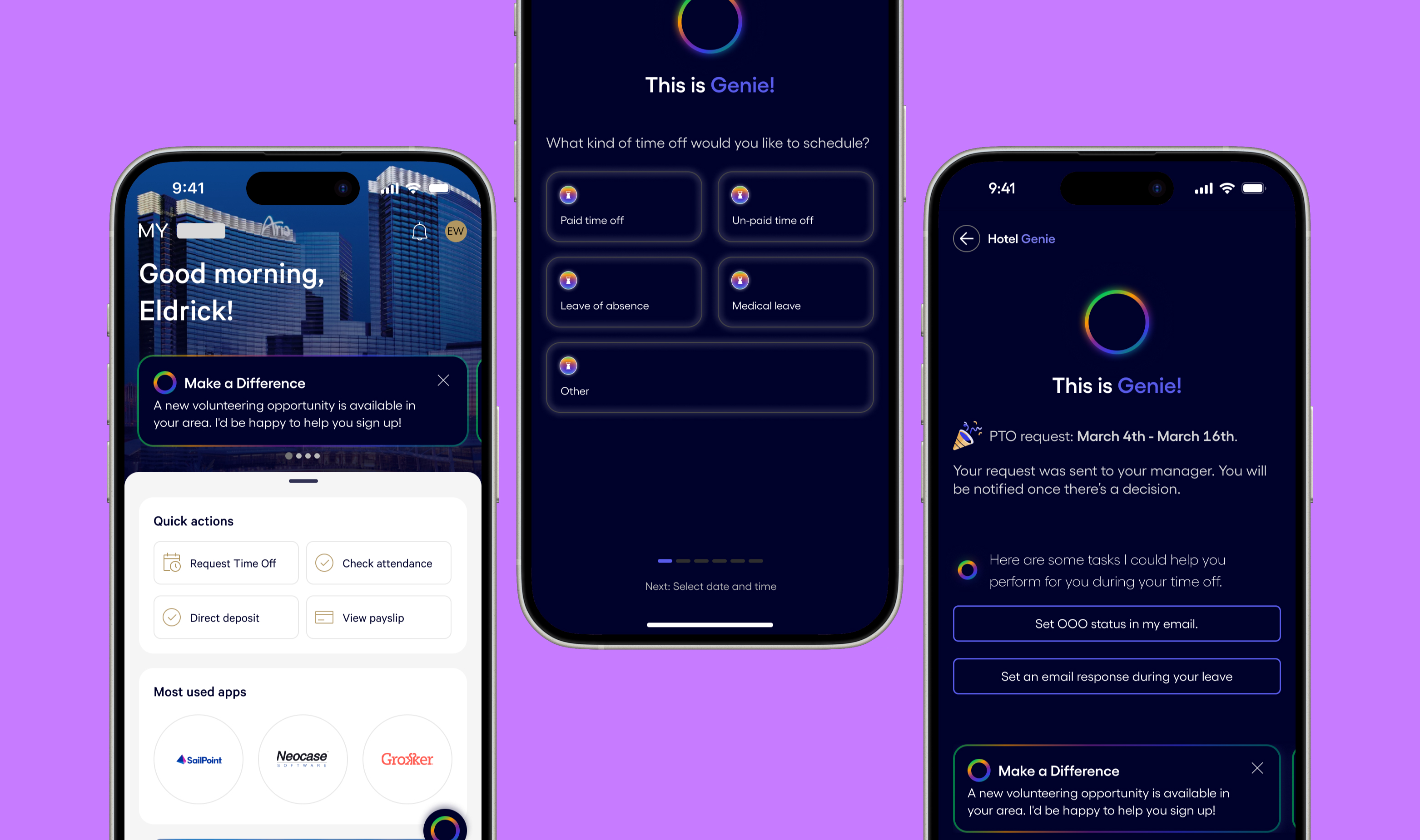
A conversational AI assistant for internal employees to manage their benefits that leverages natural language processing (NLP) and machine learning (ML) to understand and respond to employee inquiries about their benefits.
Context
This was a proof-of-concept engagement, not a shipped product, and that was the brief from the start. My work was used as a strategic sales artifact to help MGM leadership visualize and advocate for AI investment internally. Designing for influence rather than implementation required a different kind of rigor: the concept had to be credible enough to survive stakeholder scrutiny, not just look compelling.
As a global S&P 500 company, MGM Resorts International operates iconic integrated resorts, including hotels, casinos, and entertainment venues in major global markets like Las Vegas and Macau. To support its vast and diverse workforce, MGM relies on an internal Employee Hub. This platform, however, has become a significant barrier to employee efficiency and morale.
MGM’s employees are experiencing suboptimal engagement and reduced productivity due to the current Employee Hub’s inability to effectively meet their diverse needs and access preferences.
Lack of Personalization
The web platform offers a one-size-fits-all experience, lacking personalized content and features.
Inefficiency
Navigating the web platform can be time-consuming, reducing overall productivity.
Limited Accessibility
Most employees do not have access to a desktop, making their mobile devices the only way to access the platform.
Device Compatibility Issues
The web platform may not be fully optimized for use on mobile devices, leading to a subpar user experience.
Solution
My role was to lead the design of a key feature within a new mobile application that would complement the existing Employee Hub. While others worked on the broader mobile experience rebuild, I was specifically responsible for the research, strategy, and design of the AI-driven conversational functionality. This focus allowed us to deliver a cutting-edge feature that would provide employees with a more intuitive and modern way to access information without a complete overhaul of the existing platform.
The Process
Deciding What the AI Should and Shouldn’t Do
One of the earliest and most important design decisions wasn’t visual, it was definitional. Before any conversation flows were mapped, I worked with the PM to establish a clear capability boundary for the assistant: what it would handle, what it would escalate, and what it would explicitly decline. We categorized employee intents into three tiers:
- ✧Handle directly: High-frequency, low-risk queries: PTO balances, benefits summaries, ID card access, plan comparisons.
- ✧Guide and escalate: Queries requiring HR judgment or sensitive context: disputes, appeals, life event changes mid-year.
- ✧Out of scope: Anything involving legal, payroll discrepancies, or medical advice, where AI responses carry liability risk.
This tiering became the foundation of the conversation flow and it prevented a common AI product failure mode, building a system that attempts everything and does nothing well.
Designing for When Things Go Wrong
Conversational UX breaks down most visibly at the edges: ambiguous input, unsupported requests, or system failures. I mapped four failure scenarios and designed explicit recovery paths for each:
- ✧Low-confidence match: The AI isn’t sure what the user is asking. Response: reflect the query back with two clarifying options rather than guessing. (“It sounds like you’re asking about either your medical deductible or your out-of-pocket max. Which would you like?”)
- ✧Out-of-scope request: The user asks something outside the AI’s defined capability tier. Response: acknowledge, briefly explain the limit, and hand off to a named resource. Never a dead end.
- ✧No result found: The benefits data doesn’t return a match. Response: surface the most relevant adjacent information and offer a direct HR contact path.
- ✧System error / timeout: Response: plain-language acknowledgment with a retry option and fallback to the Employee Hub link.
Designing these states explicitly, not as edge cases but as first-class experiences, was critical to making the AI feel trustworthy rather than brittle.
How We Evaluated Whether the Conversations Actually Worked
Evaluating conversational UX is harder than evaluating visual UX. There’s no direct equivalent of a heatmap or a misclick. I developed a lightweight evaluation framework based on three dimensions:
- ✧Task completion: Could the user get what they came for without leaving the conversation? We traced flows to confirm each of our high-priority intents (PTO check, ID card, beneficiary lookup) resolved within 3 turns or fewer.
- ✧Recovery rate: When the AI produced a low-confidence or out-of-scope response, did the user continue or abandon? I designed recovery paths specifically to minimize drop-off at these points.
- ✧Response trust: Did the AI’s tone and framing feel credible and appropriately bounded? I applied a simple test: would an employee act on this response without double-checking with HR? For Tier 1 intents, the answer needed to be yes.
Because this was a proof-of-concept, formal usability testing wasn’t in scope, but I built the evaluation criteria so that if the concept moved to development, the team would have a clear quality bar to test against from day one.
Conversational Design User Flow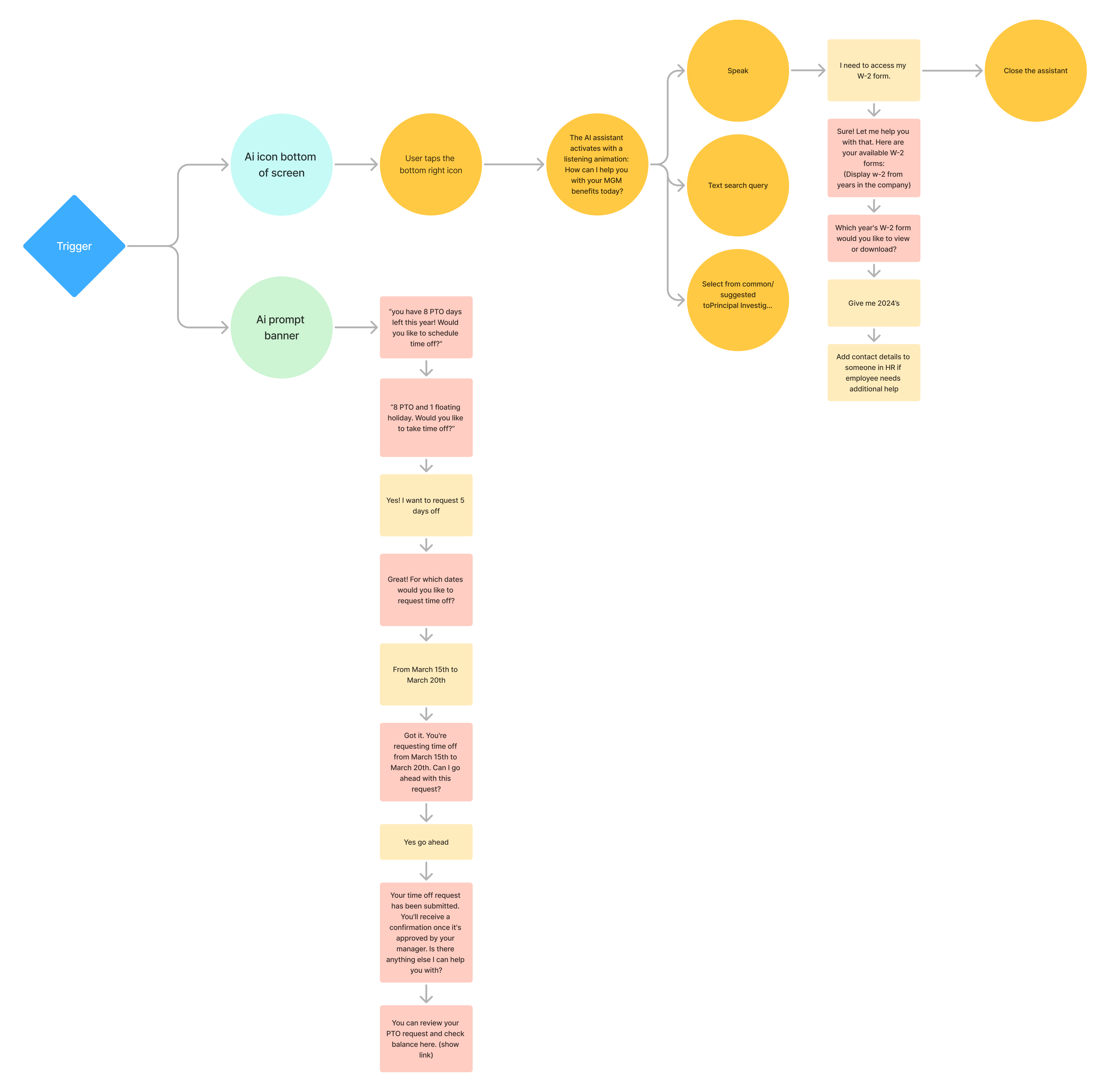

Personalized recommendations
AI algorithms analyze user behavior to provide tailored content and suggestions.
Chatbots and Virtual Assistants
AI-powered chatbots offer instant support and assistance, improving user satisfaction.
Predictive Analytics
AI tools predict user needs and trends, enabling proactive engagement and decision-making.
Results
I owned the research, conversational UX strategy, and end-to-end design of the AI assistant feature, specifically operating as the sole designer on this workstream within a larger mobile app rebuild handled by the broader team.
While not implemented, the concept played a key role in MGM’s sales pitch, serving as a proof of concept to illustrate the potential of AI in improving engagement and productivity. It helped stakeholders envision a smarter, more accessible employee experience and sparked internal discussions about the future direction of the platform.